Task Manager
This document will help you experience how to use Dragonfly's two methods of finding and clearing P2P task caches, namely Open API and console.
Open API
Use Open API to find and clear the P2P task cache.
Create personal access token
Click the ADD PERSONAL ACCESS TOKENS button to create personal access token.
Name: Set your token a descriptive name.
Description: Set a description.
Expiration: Set your token an expiration.
Scopes: Select the access permissions for the token.
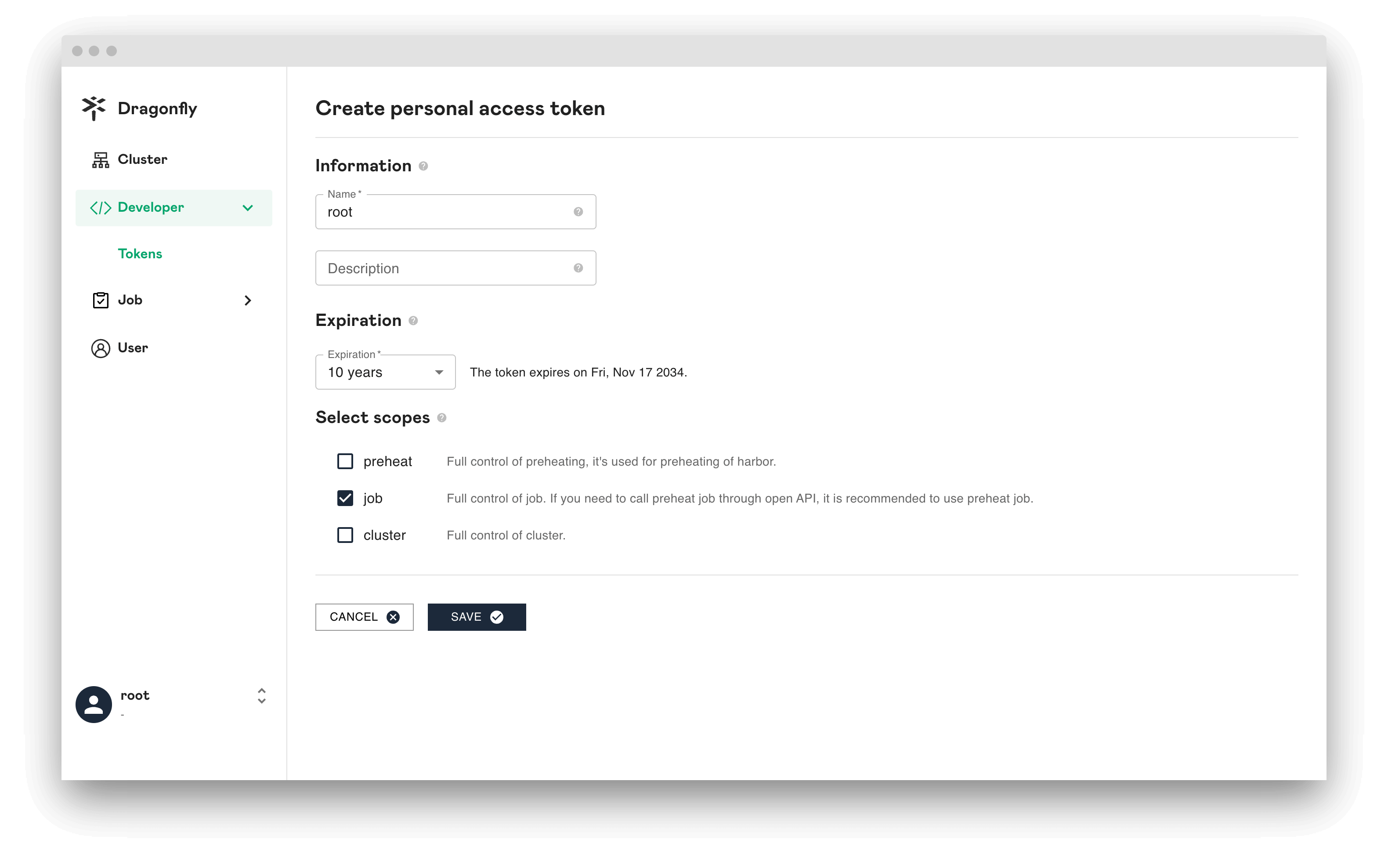
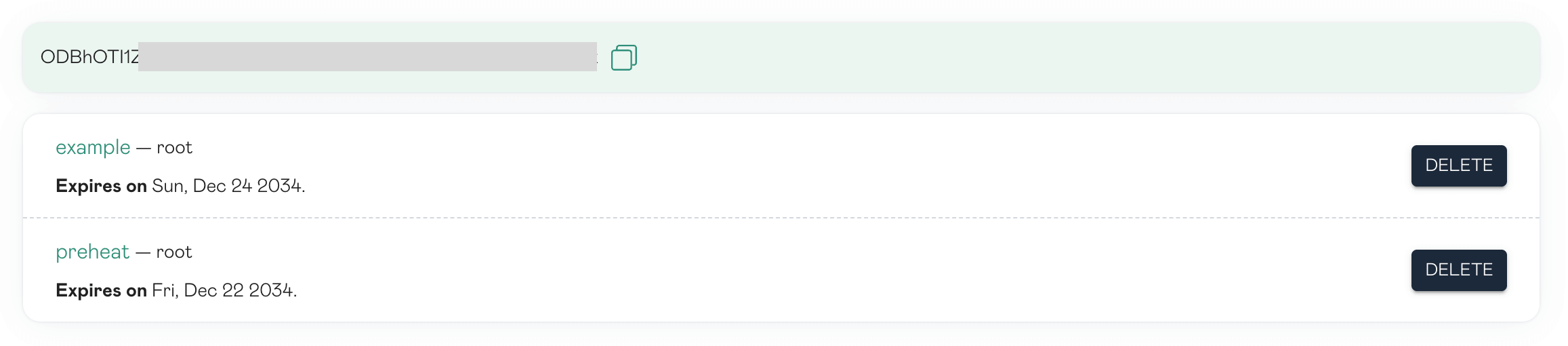
Click SAVE and copy the token and store it. For your security, it doesn't display again.
Search task
Search by URL
Use Open API for find task. First create a POST request for find task.
curl --location --request POST 'http://dragonfly-manager:8080/oapi/v1/jobs' \
--header 'Content-Type: application/json' \
--header 'Authorization: Bearer your_dragonfly_personal_access_token' \
--data-raw '{
    "type": "get_task",
    "args": {
        "url": "https://example.com",
        "tag": "your_url_tag",
        "application": "your_url_application"
    }
}'
The command-line log returns the find task job id.
{
    "id": 1,
    "created_at": "0001-01-01T00:00:00Z",
    "updated_at": "0001-01-01T00:00:00Z",
    "task_id": "group_b58cdd29-aaae-498c-beab-a24e5d325366",
    "bio": "",
    "type": "get_task",
    "state": "PENDING",
    "args": {
        "application": "",
        "filtered_query_params": "",
        "tag": "",
        "task_id": "",
        "url": "https://example.com"
    },
    "result": null,
    "seed_peer_clusters": null,
    "scheduler_clusters": [
        {
            "id": 1,
            "created_at": "2024-11-15T08:06:37Z",
            "updated_at": "2024-11-15T08:06:37Z",
            "name": "cluster-1",
        },
    ]
}
Polling the task status with job id.
curl --request GET 'http://dragonfly-manager:8080/oapi/v1/jobs/1' \
--header 'Content-Type: application/json' \
--header 'Authorization: Bearer your_dragonfly_personal_access_token'
If status is SUCCESS, it means that the find task is successful.
result.job_states.results.peers is the address of the task cache.
{
    "id": 1,
    "created_at": "2024-11-19T08:08:23Z",
    "updated_at": "2024-11-19T08:08:53Z",
    "type": "get_task",
    "state": "SUCCESS",
    "args": {
        "application": "",
        "filtered_query_params": "",
        "tag": "",
        "task_id": "",
        "url": "https://example.com"
    },
    "result": {
        "created_at": "2024-11-19T08:08:23.087253883Z",
        "job_states": [
            {
                "created_at": "2024-11-19T08:08:23.087253883Z",
                "error": "",
                "results": [
                    {
                        "peers": [
                            {
                                "created_at": "2024-11-19T08:13:35.210473555Z",
                                "host_type": "super",
                                "hostname": "dragonfly-seed-client-0",
                                "id": "10.244.1.32-dragonfly-seed-client-0-9783271e-e27c-4b16-a7c9-6a8ffe18cd1a-seed",
                                "ip": "10.244.1.32",
                                "updated_at": "2024-11-19T08:13:35.364939639Z"
                            }
                        ],
                        "scheduler_cluster_id": 1
                    }
                ],
                "state": "SUCCESS",
                "task_name": "get_task",
                "task_uuid": "task_ddc9db9d-cb7f-4abd-b1bc-b4c28f259dcb",
                "ttl": 0
            },
        ],
        "state": "SUCCESS",
        "updated_at": "2024-11-19T08:08:53.157878758Z"
    },
    "seed_peer_clusters": [],
    "scheduler_clusters": [
        {
            "id": 1,
            "created_at": "2024-11-15T08:06:37Z",
            "updated_at": "2024-11-15T08:06:37Z",
            "name": "cluster-1",
        }
    ]
}
Search by task id
Use Open API for find task. First create a POST request for find task.
curl --location --request POST 'http://dragonfly-manager:8080/oapi/v1/jobs' \
--header 'Content-Type: application/json' \
--header 'Authorization: Bearer your_dragonfly_personal_access_token' \
--data-raw '{
    "type": "get_task",
    "args": {
        "task_id": "your_task_id"
    }
}'
The command-line log returns the find task job id.
{
    "id": 1,
    "created_at": "0001-01-01T00:00:00Z",
    "updated_at": "0001-01-01T00:00:00Z",
    "task_id": "group_b58cdd29-aaae-498c-beab-a24e5d325366",
    "bio": "",
    "type": "get_task",
    "state": "PENDING",
    "args": {
        "task_id": "your_task_id",
    },
    "result": null,
    "seed_peer_clusters": null,
    "scheduler_clusters": [
        {
            "id": 1,
            "created_at": "2024-11-15T08:06:37Z",
            "updated_at": "2024-11-15T08:06:37Z",

            "name": "cluster-1",
        },
    ]
}
Polling the task status with job id.
curl --request GET 'http://dragonfly-manager:8080/oapi/v1/jobs/1' \
--header 'Content-Type: application/json' \
--header 'Authorization: Bearer your_dragonfly_personal_access_token'
If status is SUCCESS, it means that the find task is successful.
result.job_states.results.peers is the address of the task cache.
{
    "id": 1,
    "created_at": "2024-11-19T08:08:23Z",
    "updated_at": "2024-11-19T08:08:53Z",
    "type": "get_task",
    "state": "SUCCESS",
    "args": {
        "task_id": "your_task_id",
    },
    "result": {
        "created_at": "2024-11-19T08:08:23.087253883Z",
        "job_states": [
            {
                "created_at": "2024-11-19T08:08:23.087253883Z",
                "results": [
                    {
                        "peers": [
                            {
                                "created_at": "2024-11-19T08:13:35.210473555Z",
                                "host_type": "super",
                                "hostname": "dragonfly-seed-client-0",
                                "id": "10.244.1.32-dragonfly-seed-client-0-9783271e-e27c-4b16-a7c9-6a8ffe18cd1a-seed",
                                "ip": "10.244.1.32",
                                "updated_at": "2024-11-19T08:13:35.364939639Z"
                            }
                        ],
                        "scheduler_cluster_id": 1
                    }
                ],
                "state": "SUCCESS",
                "task_name": "get_task",
                "task_uuid": "task_ddc9db9d-cb7f-4abd-b1bc-b4c28f259dcb",
                "ttl": 0
            },
        ],
        "state": "SUCCESS",
        "updated_at": "2024-11-19T08:08:53.157878758Z"
    },
    "scheduler_clusters": [
        {
            "id": 1,
            "created_at": "2024-11-15T08:06:37Z",
            "updated_at": "2024-11-15T08:06:37Z",
            "name": "cluster-1",
        }
    ]
}
Delete task
Delete by URL
Use Open API for delete task. First create a POST request for delete task.
If scheduler_cluster_ids does not exist, it means deleting all caches of the task.
scheduler_cluster_ids is the result.job_states.results.scheduler_cluster_id of the search task.
curl --location --request POST 'http://dragonfly-manager:8080/oapi/v1/jobs' \
--header 'Content-Type: application/json' \
--header 'Authorization: Bearer your_dragonfly_personal_access_token' \
--data-raw '{
    "type": "delete_task",
    "args": {
        "url": "https://example.com",
        "tag": "your_url_tag",
        "application": "your_url_application"
    },
    "scheduler_cluster_ids":[your_scheduler_cluster_id]
}'
The command line log returns the deletion task job id.
{
  "id": 2,
  "created_at": "0001-01-01T00:00:00Z",
  "updated_at": "0001-01-01T00:00:00Z"
  "task_id": "group_9da544b6-ac3d-4434-9c80-56b137c7e2be",
  "bio": "",
  "type": "delete_task",
  "state": "PENDING",
  "args": {
    "application": "",
    "filtered_query_params": "",
    "tag": "",
    "url": "https://example.com"
  },
  "result": null,
  },
  "scheduler_clusters": [
    {
      "id": 1,
      "created_at": "2024-11-15T08:06:37Z",
      "updated_at": "2024-11-15T08:06:37Z",
      "name": "cluster-1",
    },
  ]
}
Polling the delete task status with job id.
curl --request GET 'http://dragonfly-manager:8080/oapi/v1/jobs/2' \
--header 'Content-Type: application/json' \
--header 'Authorization: Bearer your_dragonfly_personal_access_token'
If the status is SUCCESS and failure_tasks is empty, it means that the deletion task is successful.
{
    "id": 2,
    "created_at": "2024-11-19T07:51:46Z",
    "updated_at": "2024-11-19T07:52:45Z"
    "task_id": "group_909c09ee-4d4f-4033-be95-08dd800330bd",
    "bio": "",
    "type": "delete_task",
    "state": "SUCCESS",
    "args": {
      "application": "",
      "filtered_query_params": "",
      "tag": "",
      "task_id": "",
      "url": "https://example.com"
    },
    "result": {
        "created_at": "2024-11-19T07:51:46.33966588Z",
        "job_states": [
            {
                "created_at": "2024-11-19T07:51:46.33966588Z",
                "error": "",
                "results": [
                    {
                        "failure_tasks": [],
                        "scheduler_cluster_id": 1,
                        "success_tasks": [
                            {
                                "host_type": "super",
                                "hostname": "dragonfly-seed-client-0",
                                "ip": "10.244.1.32"
                            }
                        ]
                    }
                ],
                "state": "SUCCESS",
                "task_name": "delete_task",
            },
        ],
        "state": "SUCCESS",
        "updated_at": "2024-11-19T07:52:44.646613879Z"
    },
    "scheduler_clusters": [
        {
            "id": 1,
            "created_at": "2024-11-15T08:06:37Z",
            "updated_at": "2024-11-15T08:06:37Z",
            "name": "cluster-1",
        }
    ]
}
Delete by task id
Use Open API for delete task. First create a POST request for delete task.
If scheduler_cluster_ids does not exist, it means deleting all caches of the task.
scheduler_cluster_ids is the result.job_states.results.scheduler_cluster_id of the search task.
curl --location --request POST 'http://dragonfly-manager:8080/oapi/v1/jobs' \
--header 'Content-Type: application/json' \
--header 'Authorization: Bearer your_dragonfly_personal_access_token' \
--data-raw '{
    "type": "delete_task",
    "args": {
        "task_id": "your_task_id"
    },
    "scheduler_cluster_ids":[your_scheduler_cluster_id]
}'
The command line log returns the deletion task job id.
{
  "id": 2,
  "created_at": "0001-01-01T00:00:00Z",
  "updated_at": "0001-01-01T00:00:00Z"
  "task_id": "group_9da544b6-ac3d-4434-9c80-56b137c7e2be",
  "bio": "",
  "type": "delete_task",
  "state": "PENDING",
  "args": {
    "task_id": "your_task_id",
  },
  "result": null,
  },
  "scheduler_clusters": [
    {
      "id": 1,
      "created_at": "2024-11-15T08:06:37Z",
      "updated_at": "2024-11-15T08:06:37Z",
      "name": "cluster-1",
    },
  ]
}
Polling the delete task status with job id.
curl --request GET 'http://dragonfly-manager:8080/oapi/v1/jobs/2' \
--header 'Content-Type: application/json' \
--header 'Authorization: Bearer your_dragonfly_personal_access_token'
If the status is SUCCESS and failure_tasks is empty, it means that the deletion task is successful.
{
    "id": 2,
    "created_at": "2024-11-19T07:51:46Z",
    "updated_at": "2024-11-19T07:52:45Z"
    "task_id": "group_909c09ee-4d4f-4033-be95-08dd800330bd",
    "bio": "",
    "type": "delete_task",
    "state": "SUCCESS",
    "args": {
        "task_id": "your_task_id",
    },
    "result": {
        "created_at": "2024-11-19T07:51:46.33966588Z",
        "job_states": [
            {
                "created_at": "2024-11-19T07:51:46.33966588Z",
                "error": "",
                "results": [
                    {
                        "failure_tasks": [],
                        "scheduler_cluster_id": 1,
                        "success_tasks": [
                            {
                                "host_type": "super",
                                "hostname": "dragonfly-seed-client-0",
                                "ip": "10.244.1.32"
                            }
                        ]
                    }
                ],
                "state": "SUCCESS",
                "task_name": "delete_task",
            },
        ],
        "state": "SUCCESS",
        "updated_at": "2024-11-19T07:52:44.646613879Z"
    },
    "scheduler_clusters": [
        {
            "id": 1,
            "created_at": "2024-11-15T08:06:37Z",
            "updated_at": "2024-11-15T08:06:37Z",
            "name": "cluster-1",
        }
    ]
}
Console
Use console to find and clear the P2P task cache.
Search task
Search by URL
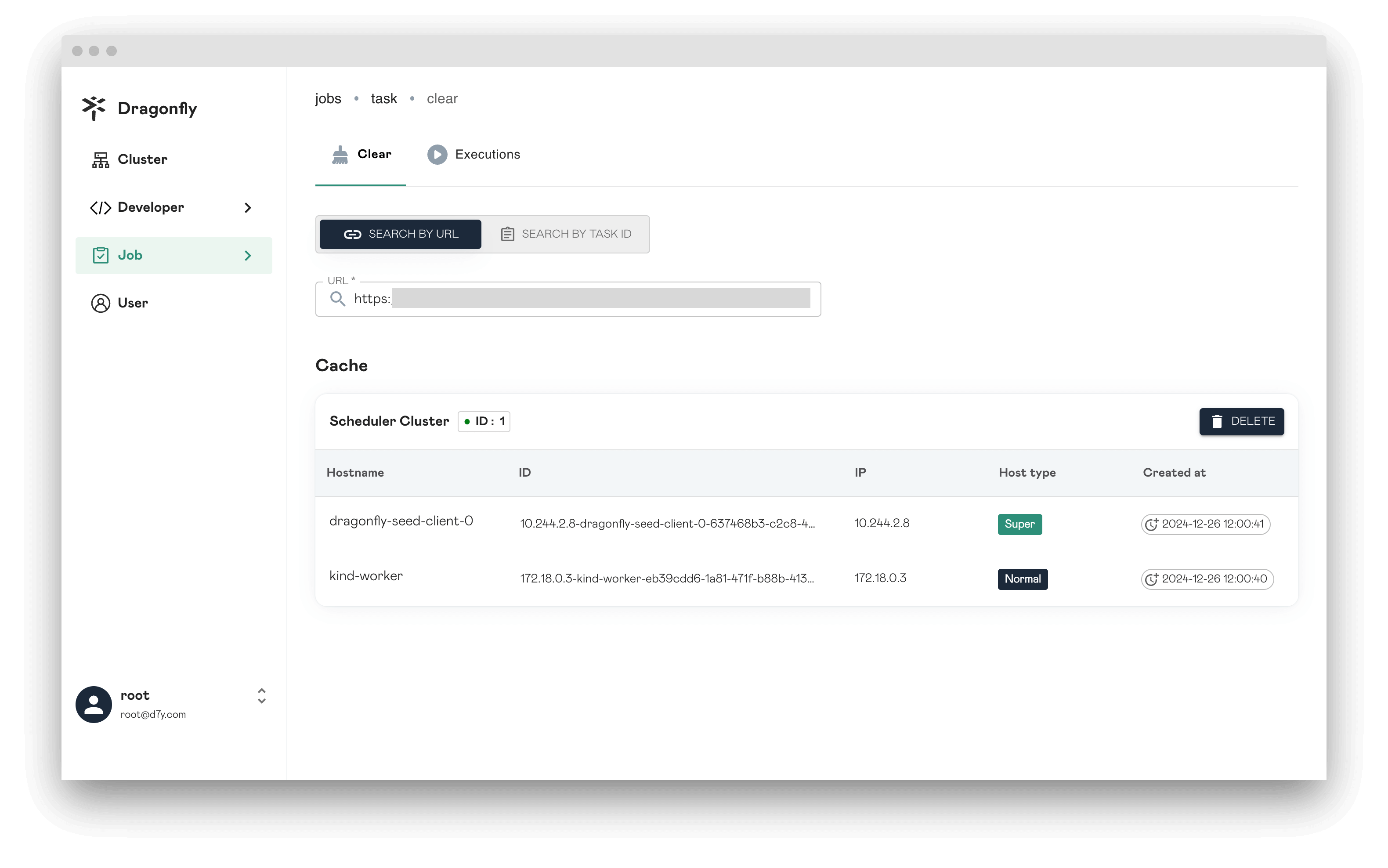
URL: Query the task cache based on the URL.
Tag: When the task URL is the same but the tags are different, they will be distinguished based on the tags, and the queried tasks will also be different.
Application: Caller application which is used for statistics and access control.
Filter Query Params: Filter the query parameters of the downloaded URL. If the download URL is the same, it will be scheduled as the same task.
Search by task id
Task ID: Query the task cache based on the task id.
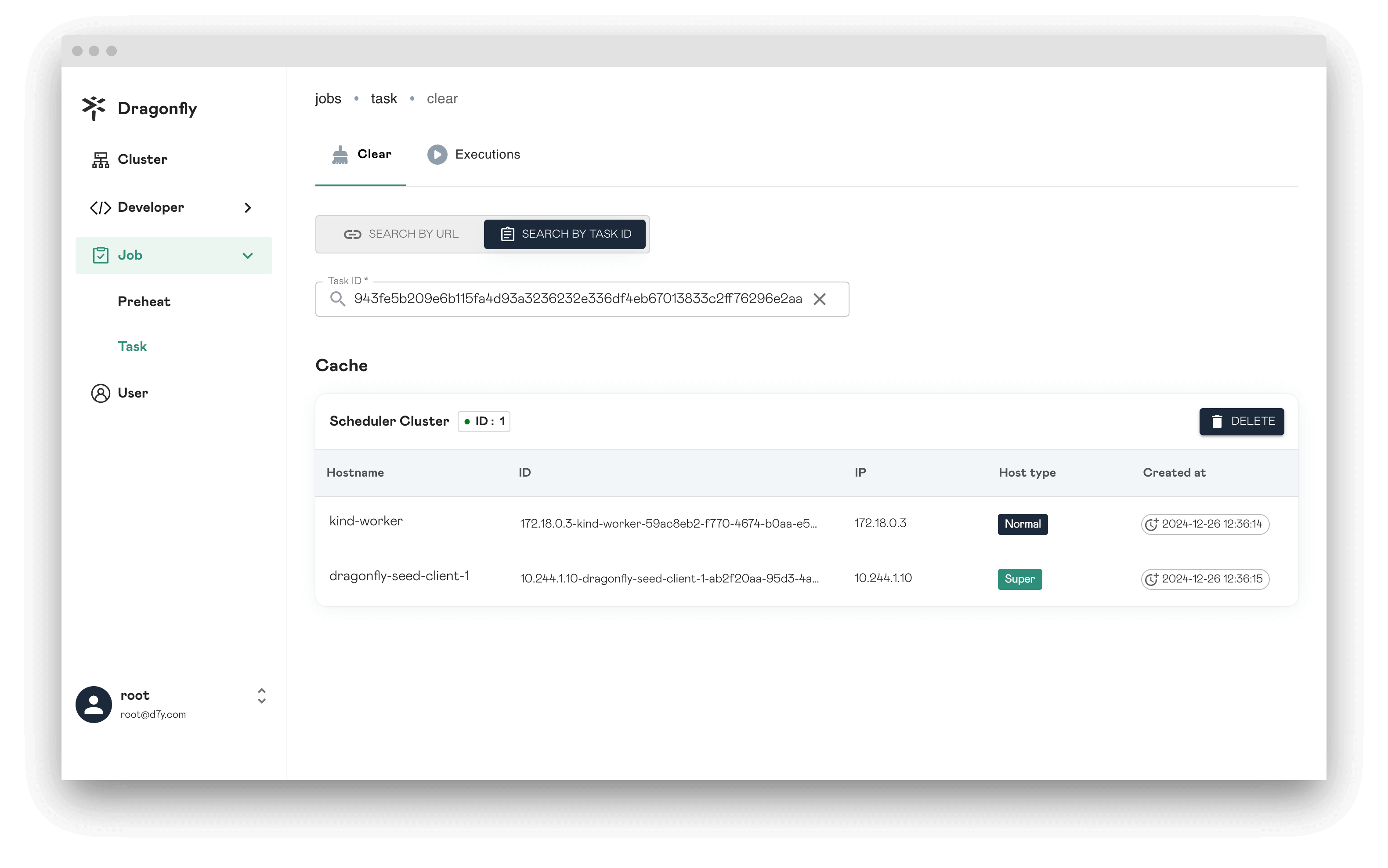
Delete task
Click DELETE and delete task.
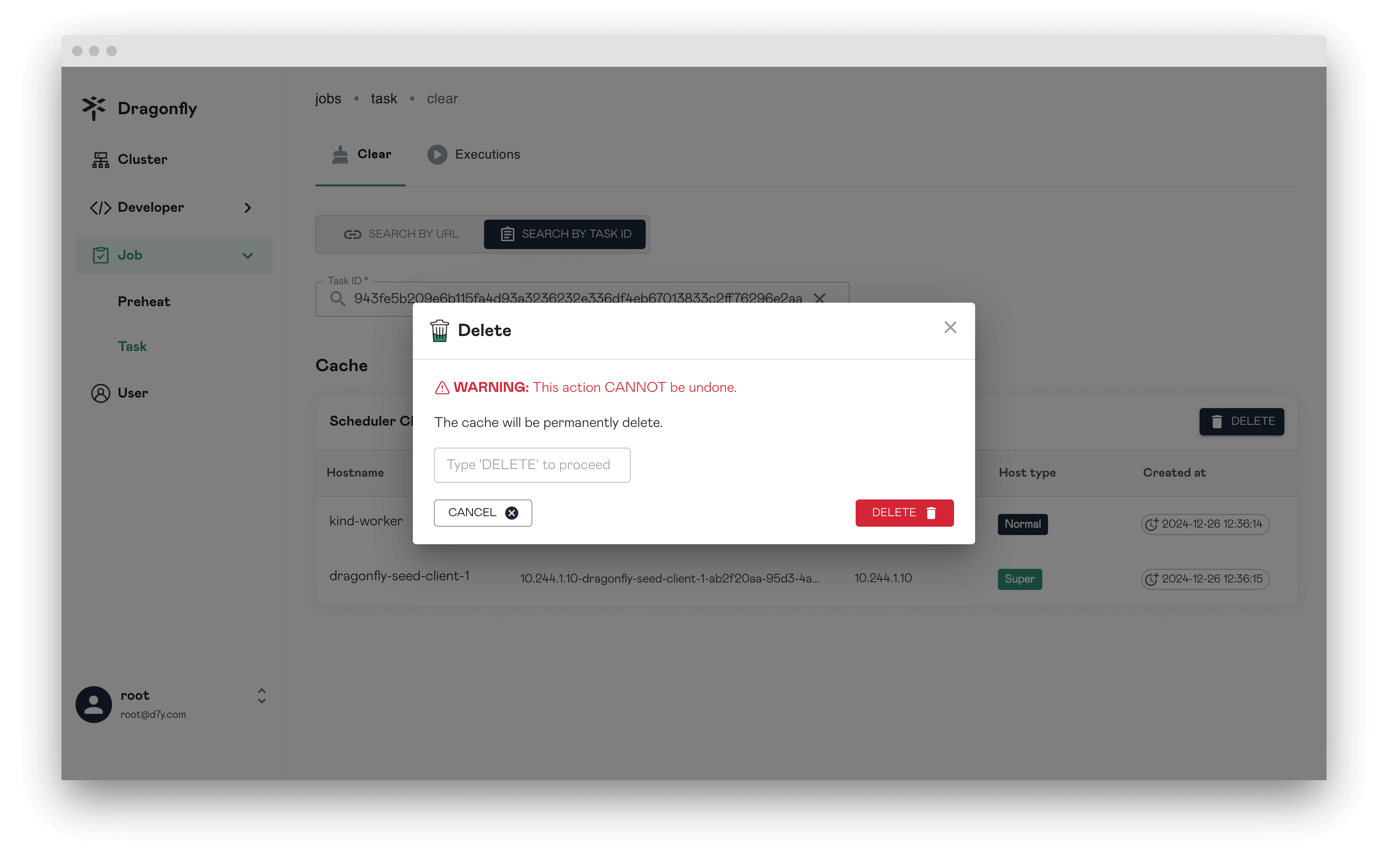
The deleted task will not return results immediately and you need to wait.
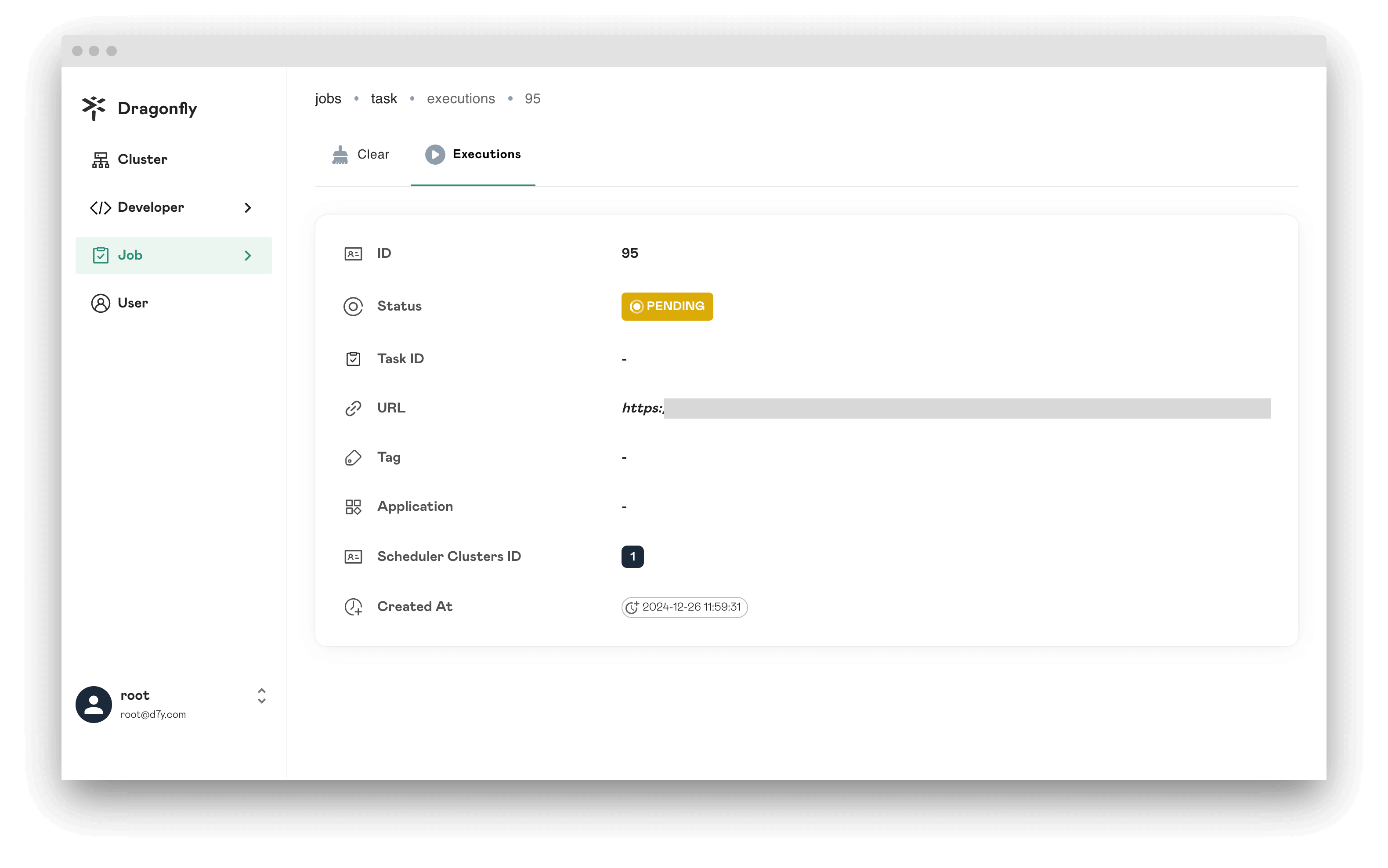
Executions
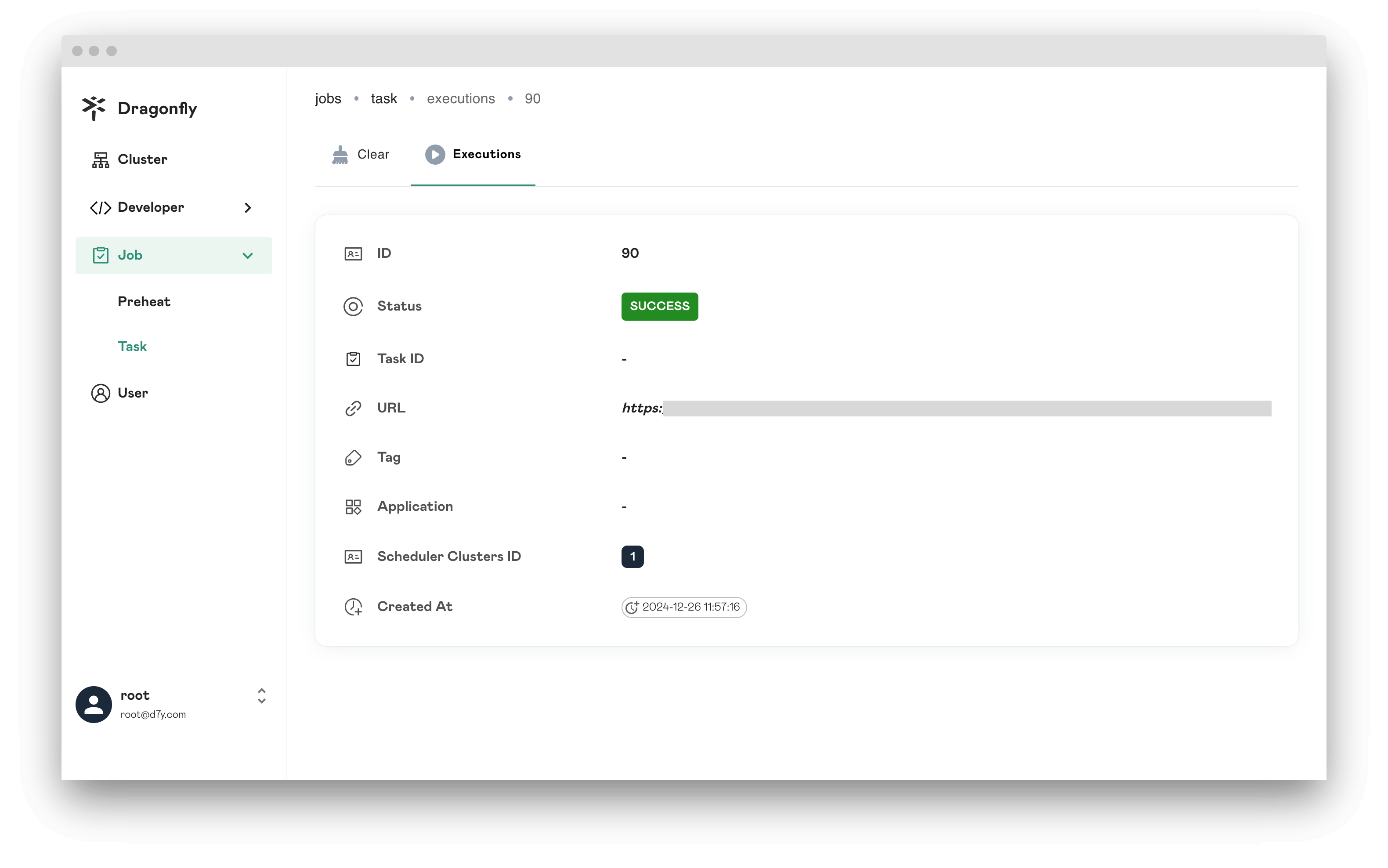
Displays all deleted task.
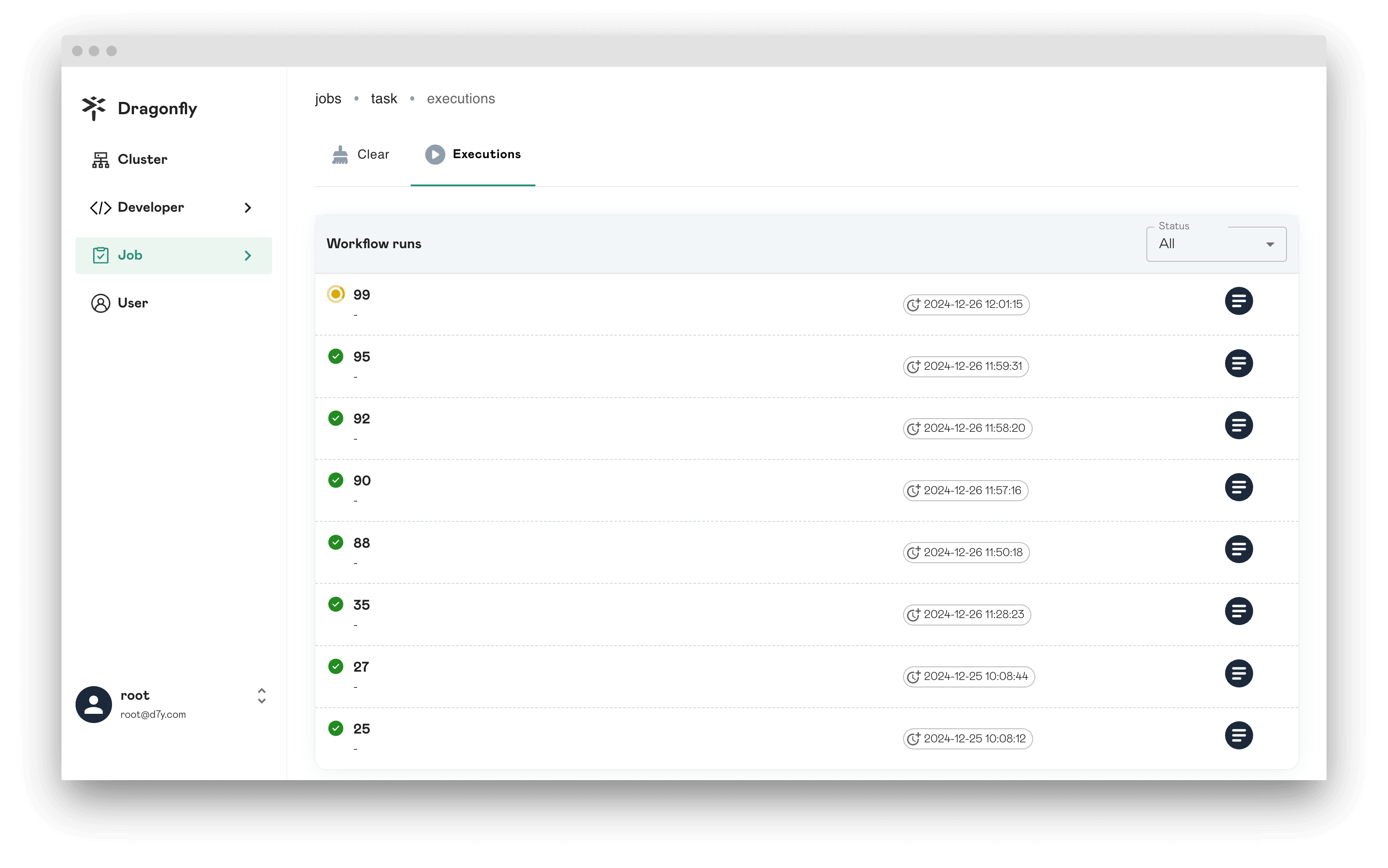
Delete successfully
If the status is SUCCESS and the Failure list does not exist, it means that the deletion task is successful.
Delete failed
The Failure list will show the tasks that failed to execute.
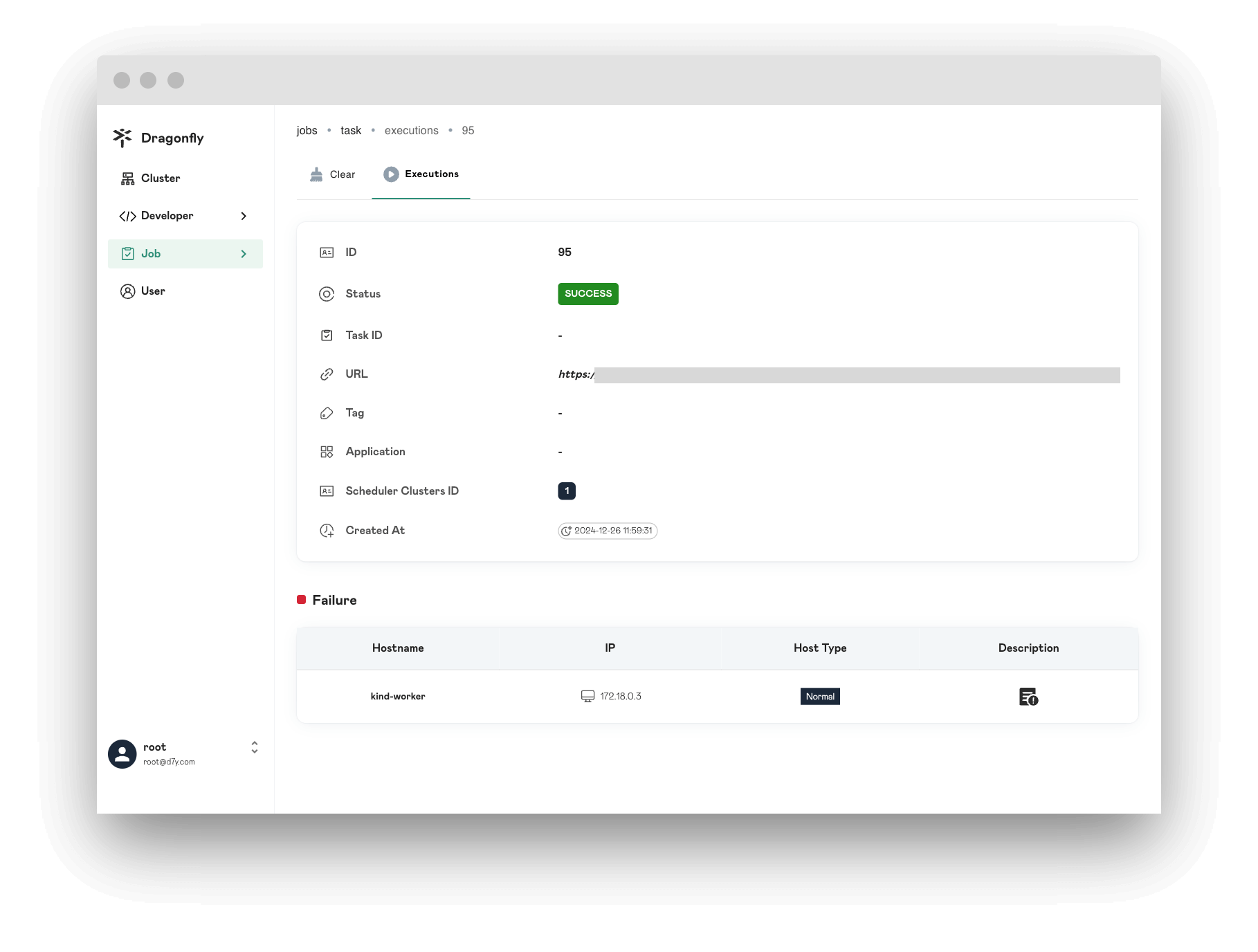
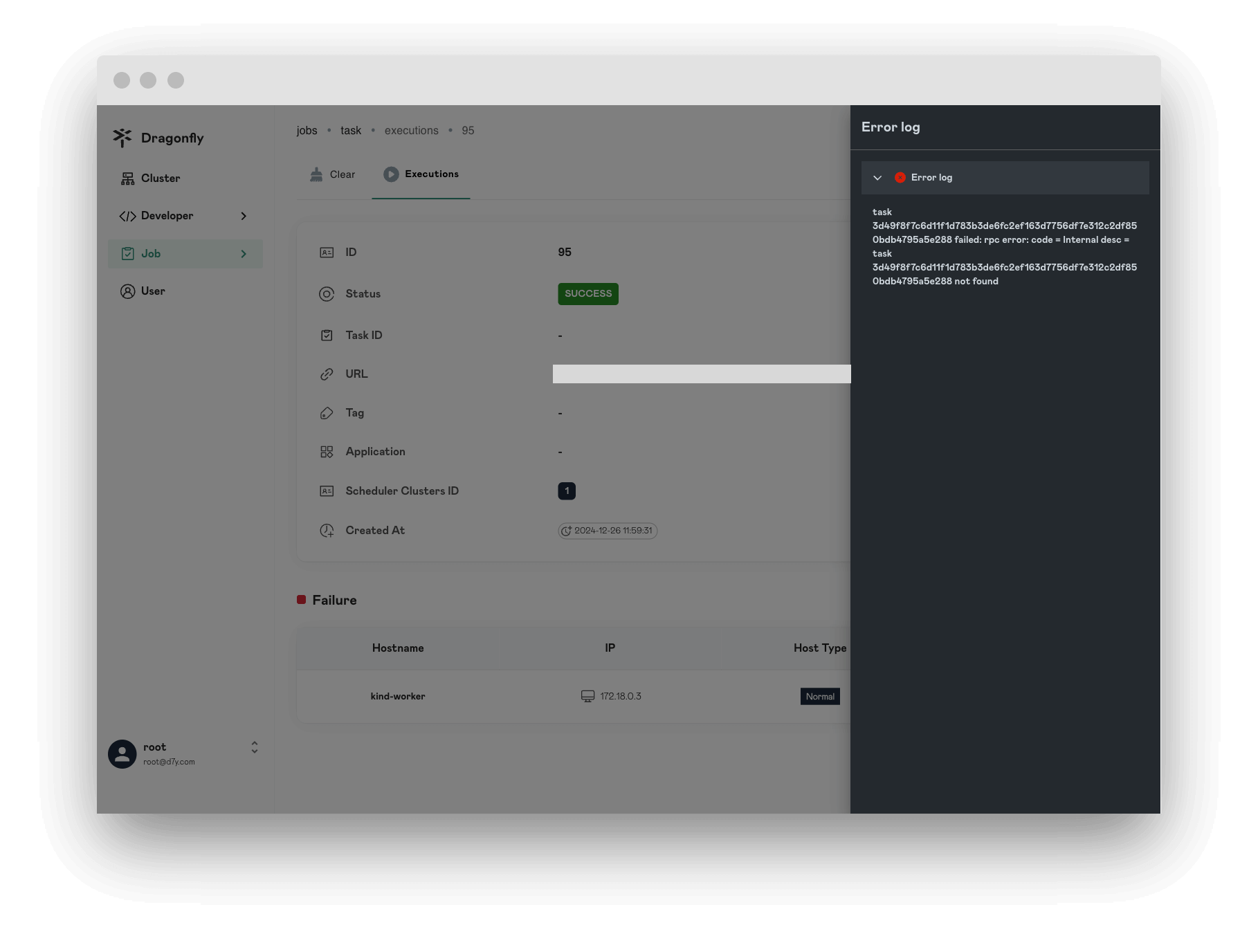
Click the Description icon to view the failure log.